CTA Bus Tracker SM can give you estimated arrival times by text message (works on most mobile phones*) with CTA Bus Tracker by Text.
You can get information online in advance of your trip, or find information on how to text at any posted bus stop! Let us know what you think at [email protected].
Getting information in advance
 It's easy as 1-2-3:
- Find your stop ID.
- Text ctabus [stopID] to 41411
Be sure to text the word "ctabus", a space, and then the
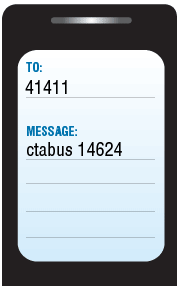
actual stop ID number, such as "ctabus 14624" (without quotes).
- Receive estimated arrival times.
*Important note: Message and data rates may apply. Check with your mobile carrier first. If you need help, e-mail us at [email protected].
At the bus stop
Information about how to text for estimated arrival times from Bus Tracker are now appearing on all posted CTA bus stops. Simply look at the bottom of the bus stop sign for instructions:
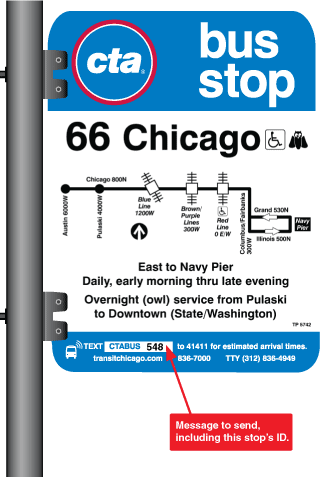
Example
Here's how the text message you send might look if you were going to catch a #53 Pulaski bus at Fullerton heading south (which stops at stop ID 14624). The bus stop sign at the stop will say to "Text ctabus 14624 to 41411 for estimated arrival times."
Try it!
|
Send ctabus 14624 to 41411, like this:
|
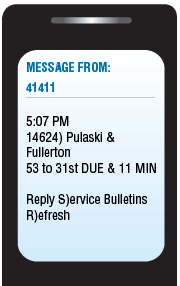
After your message is received, you'll get a message like this:
|
This example response says that, as of 5:07 PM, at stop 14624 (at Pulaski & Fullerton), Bus Tracker estimates that a #53 bus to 31st is due to arrive, and then another one should arrive in about 11 minutes.
Additional Commands
Also, you can also reply to this message with "S" to get any service bulletins that may affect your trip (customer alerts), or "R" to get the latest, most updated result for the same stop.
If your stop has multiple routes serving it, your results may not fit in one text message. In that case, you can also reply with "N" to see the next result for the stop you requested.
If you have subscribed to receive text messages for service alerts or arrivals at scheduled times from the CTA Bus Tracker website, you can always reply with (or send a new text with) "STOP" to unsubscribe.
(Remember: Message and data rates may apply. Check with your mobile carrier first.)
Narrowing your results
To get just the routes you're interested (and potentially reduce the number of texts you need to send or receive to get the information you want), you can also specify a route number in your request. Add "rt[#]" (with the route number instead of the number sign) to your request.
Example:
ctabus 1124 rt3
Instead of getting all results for buses predicted to arrive at stop 1124 (Michigan & Ontario), you'll only get results for #3 King Drive buses.
Other ways to find stop IDs
In addition to looking at the instructions on the bottom of a CTA Bus Stop sign (or posted information at bus stations, such as on Loop Link downtown), there are two other ways to find bus stop IDs:
- Specific instructions appear on the CTA Bus Tracker website after you've looked up any stop alongside arrival times.
- Bus stop lists exist for all fixed routes and list all stops in each direction as well as info about where that stop is in relation to an intersection and the bus stop ID you can use when sending a text for arrival times. To find your route's bus stop list, go to Schedules and pick your route.